Average Reviews:

(More customer reviews)The Search
--------------------
My cards stock cooler recently died, leading me to believe my card was dead along with it.
After a bit of research I discovered that with the 5970 there were two methods of cooling that don't
involve using the stock cooler:
1. Watercooling, which is the most effective solution, but is also incredibly expensive, just
the waterblock for the 5970 costs nearly $200!
2. Arctic Cooling's 5970 cooler. This one is not as effective as watercooling, but
is obviously much more affordable.
After deciding to replace the stock cooler with the Accelero Xtreme (Xs for letters are so 1990!)
I was pleasantly surprised with how effective the cooling was, but even more so with how much quieter the cooler was.The Results
-----------------
All results were measured using GPU-Z
with a room temperature of 21c.
XFX 5970 stock settings.
-Average Temps at 38% fan speed: 38c-41c at idle.
-Noise level at 38% fan speed: small car motor.
-Average Temps at 50% fan speed: 60c-66c at high load.
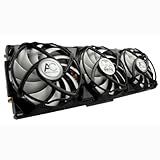
-Noise level at 50% fan speed: Vacuum cleaner next to ear.Arctic Cooling Accelero XTREME 5970 VGA Cooler
My fan always runs at 80%
-Average idle Temps: 28-31c
-Average load Temps: 56-60c
-Noise level at 80% fan speed: inaudible over my case fans.While the cooling performance at load isn't substantially lower than
the stock cooler, its the quieter performance that really makes me like
this cooler. Obviously without using proper tools my noise analysis is very
subjective, but the noise difference from the stock cooler is very substantial.Conclusion
---------------
While I still believe the cooler should be sold at closer to $50-60 instead of its current
price, I will say that if your looking to get cooler temps, and more importantly a quieter cooler
than you certainly can't go wrong with the Arctic Cooling Accelero XTREME 5970 VGA Cooler.
Definitely recommended!
Bonus: Arctic Cooling Accelero XTREME 5970 VGA Cooler Installation Guide!
-------------------------------------------------------------------------------------
I take no responsibility for any damage caused to your card by using this guide, I'm just going
to post how I successfully installed the cooler without damaging the card so others can get an idea
of how not to kill their DVI ports.*Step 1:
Remove the screws and the X-plates (2 X-shaped metal braces above cores) from your card.
Make sure to unscrew the X-plate in a diagonal pattern.
*Step 2:
Carefully sit the backplate and stock cooler aside, and turn the card over so you can see
the two cores, all the circuits and the memory chips.
*Step 3:
Following the included instructions, wipe any residual cooling paste off the cores, and place
the thermal pads on all the indicated memory chips and circuitry. Make sure to screw in the
included memory heatsink as indicated.
*Step 4:
Place the new cooler over the cores making sure to line it up properly. Flip the card over and
place the backplate back on.
*Step 5:
Carefully replace all the backplate screws.
Fully tighten all the screws except for the X-plate screws, do these last.
*Step 6:
Add both X-plate bracers back to their appropriate spots, and GENTLY screw in each screw in a diagonal
pattern being sure to only give each screw about 3-4 gentle twists, you only want these screws at about
50% of their original tightness DO NOT OVER-SCREW! If you over-screw your card will be damaged! This extra strain
is what is killing the DVI ports.At this point you should be finished, just be gentle when handling the card, and do not hold it just by the heatsink or backplate.
Hope this helps someone!
Click Here to see more reviews about: Arctic Cooling Accelero XTREME 5970 VGA Cooler
Product Description:
As an extension of the acclaimed Accelero XTREME series, this 3-fan cooler is specially designed for the ATI Radeon HD 5970. The performance is exellent 40C cooler then the stock cooler running at only 0.5 Sone. Overclocking can be maximized to a new level, making the Accelero XTREME 5970 the most effective cooler for this high-end graphic card.Excellent cooling performanceBoth models are equipped with three 92mm PWM fans running from 900 to 2,000 RPM, generating 81 CFM airflow for efficient heat dissipation from the core(s).The Accelero XTREME 5970 is designed with an 8-heatpipe and 119-fin architecture to achieve 300 watts cooling for the dual-GPU Radeon HD5970. A layer of the ARCTIC MX-2 thermal compound is also pre-applied on the base of Accelero XTREME 5970.The results are very promising- the GPU temperature of Radeon HD5970 is now 40

No comments:
Post a Comment